Craftznake
Why Terminal Emulator Engine?
May 9, 2026
This post is a retrospective on building Kai (Kommand Line Artificial Intelligence)—a project born from a simple goal: preserve the exact, predictable terminal behavior we all expect, while injecting agent suggestions that deeply understand the full session context.
Note that the findings here are drawn entirely from my own hands-on experience wrestling with terminal emulators during development. They reflect my personal architectural journey rather than a definitive textbook on the subject.
Building Kai broke my brain a little bit.
When I started, the vision was simple, almost naive: I wanted to keep the normal, predictable terminal behavior we all rely on, but inject an AI agent that actually understood the full context of what I was doing. No gimmicks, no separate chat windows. I wanted the agent to live in my natural habitat, looking over my shoulder, offering smart suggestions based on exactly what was happening on my screen.
But my first implementation was built on a lie.
I had this flawed mental model that I could just run each command in isolation, grab the output, and hand it over to the agent. It looked fantastic at first. And then, the second I tried to use it for real work, it immediately fell apart.
I realized very quickly that you cannot build a modern, context-aware AI assistant for the command line without building a literal terminal emulator engine from scratch. To understand why my initial code failed so spectacularly, you have to understand the heavy weight of history we are dragging along with us every time we open a shell.
The Ghost in the Machine: 1970s Hardware
We call the application on our laptops a "terminal," but that word is a historical fossil. And misjudging the exact boundary layer of that fossil is why my initial architecture for Kai failed.
In the 1970s, a terminal was a physical piece of hardware-a clunky, mechanical Teletype machine or a glass-screen video terminal (like the DEC VT100) sitting on a desk. It performed zero local computing. It simply transmitted raw keystrokes down a physical serial cable to a massive mainframe computer, which in turn streamed back a sequence of bytes to be printed on paper or rendered on a cathode-ray tube.
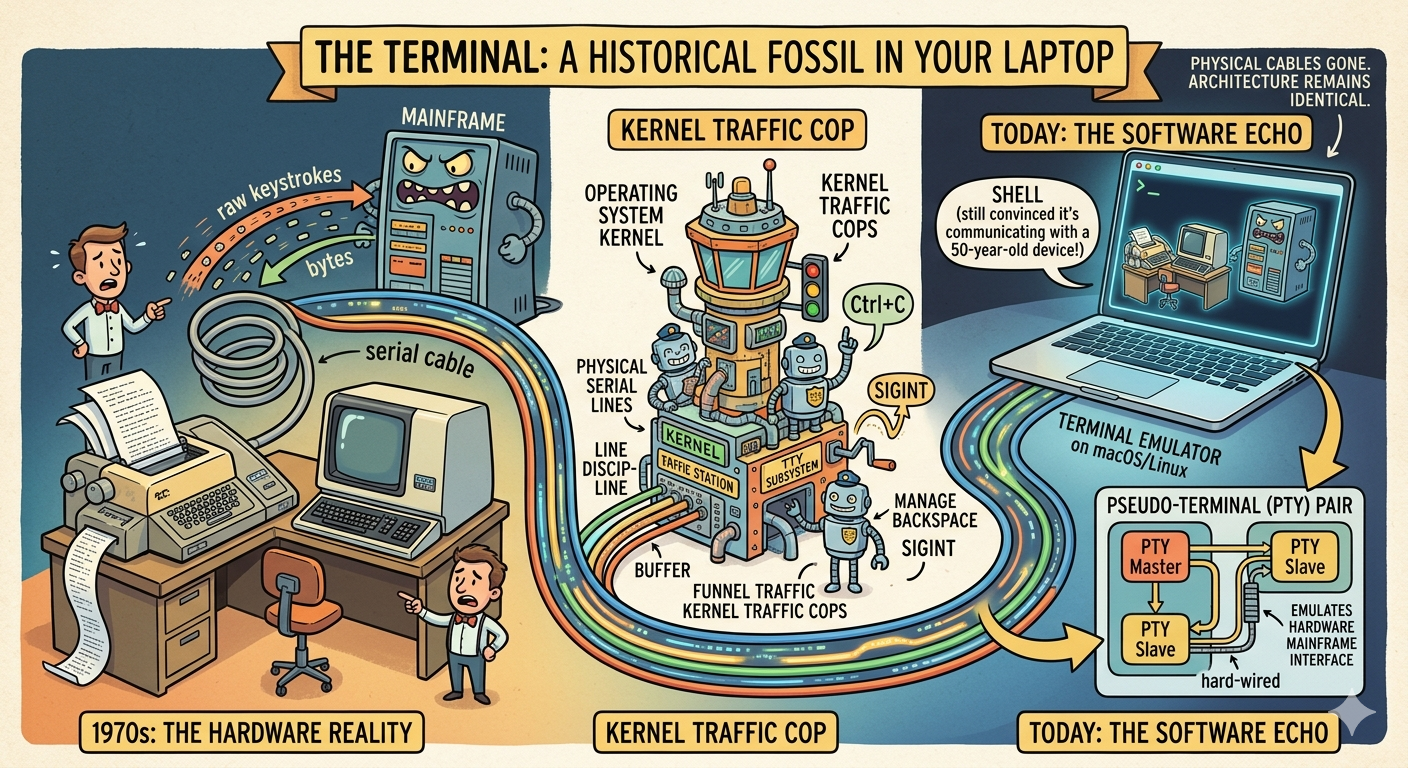
Because compute was expensive and multi-tenancy was non-trivial, the operating system kernel had to act as the direct traffic cop between these dumb endpoints and running execution streams. This gave rise to the TTY subsystem in Unix—a stateful layer of software inside the kernel designed explicitly to manage physical serial lines, enforce line discipline (like managing the buffer when you hit backspace), and handle asynchronous signal delivery (like translating a Ctrl+C into a SIGINT).
Today, the physical cables and hardware terminals are gone, but the kernel architecture remains fundamentally identical.
When you open a terminal emulator on macOS or Linux, the operating system allocates a pseudo-terminal (PTY) pair. The PTY master acts as the bidirectional software interface for the emulator itself, while the PTY slave emulates the hardware mainframe interface. The execution layer—your shell—is entirely convinced it is communicating with a physical hardware device from 50 years ago via a stateful serial line.
My first implementation of Kai completely bypassed this architectural reality. I treated a stateful kernel subsystem like a stateless execution API, operating under the assumption that a shell was just a standard POSIX process that consumed a string and spat out text. It was a clean abstraction on paper, but it completely broke under real-world terminal semantics.
Process continuity is non-negotiable
This immediately broke my heart. More critically, interactive applications—things like vim, htop, or multi-stage git prompts—fail instantly because they rely on an active, line-disciplined TTY channel to negotiate window resizing and raw input mode. If that channel isn't there, the binary either panics or hangs indefinitely.
The fix was moving to proper PTY session ownership. I had to stop trying to cheat the system, rip out the wrappers, and face the old Unix plumbing. Kai writes to the PTY master, the shell owns the PTY slave, and the kernel enforces true TTY semantics such as line discipline and signal delivery.
// Naive approach: one process per command.func RunCommand(cmd string) (string, error) {c := exec.Command("zsh", "-lc", cmd)out, err := c.CombinedOutput()return string(out), err}RunCommand("export KAI=true")out, _ := RunCommand("echo $KAI") // empty: state was not preserved
This immediately broke my heart. More critically, interactive applications—things like vim, htop, or multi-stage git prompts—fail instantly because they rely on an active, line-disciplined TTY channel to negotiate window resizing and raw input mode. If that channel isn't there, the binary either panics or hangs indefinitely.
The fix was moving to proper PTY session ownership. I had to stop trying to cheat the system, rip out the wrappers, and face the old Unix plumbing. Kai writes to the PTY master, the shell owns the PTY slave, and the kernel enforces true TTY semantics such as line discipline and signal delivery.
Output is protocol data, not plain text
After fixing the PTY correctness, parsing became the real nightmare. I discovered that solving the process lifetime problem wasn't enough; the data coming out of the PTY master was absolute gibberish.
Terminal output is not a clean string of text. It is a chaotic, volatile, mixed stream of printable characters intertwined with ANSI/VT escape sequences—control codes that tell the screen where to move the cursor, how to color text, and when to clear the screen.
My early prompt-delimiter hack was a fragile shortcut born out of frustration. I assumed I could parse the stream by looking for a specific marker.
// Fragile shortcut: delimiter-based parsing.func StartSession(shell string) (*Session, error) {sh := exec.Command(shell, "-i")sh.Env["PROMPT"] = "$KAI: "// ...}
Naturally, it blew up. It failed the moment a user used a custom prompt theme like Starship. It failed when the output contained progress bars that constantly rewrote the same line using carriage returns (\r). It failed completely when a user opened full-screen tools like vim or htop that manipulate the entire screen buffer.
I realized then why a simple buffer wasn't enough for an AI agent. The AI doesn't just need to see the raw stream of bytes; the AI needs to see what the user sees on their screen. If a program prints text, moves the cursor up two lines, deletes three characters, and overwrites them, a human only sees the final result. But a raw text wrapper sees both the old text and the new text jumbled together, deeply confusing the language model.
The only reliable path forward—the one that saved my sanity—was building a true terminal emulator engine with a deterministic parser state machine grounded in decades-old VT and xterm control semantics. Two references that were particularly useful were the DEC ANSI parser notes and the xterm control sequence documentation.
// Stream parser: explicit state transitions based on VT100/xterm standards.func (p *Parser) Feed(data []byte) {for _, b := range data {switch p.state {case StateNormal:if b == 0x1b { p.state = StateEscape } else { p.buffer.WriteByte(b) }case StateEscape:p.handleControlSequence(b)}}}
By implementing a real emulator engine, Kai now maintains an internal, virtual 2D grid of cells, exactly like the screen buffer of modern emulators. When the byte stream comes in, the parser updates the grid.
When the AI agent needs context, I don't give it a messy log of raw terminal output; I scrape the precise state of the virtual screen grid. The agent sees exactly what characters are visible to the human eye.
It was a grueling journey of fighting legacy architecture and reading ancient hardware manuals, but getting the terminal emulator foundations right was the only way to build something truly worthy of a developer's workflow. You can't shortcut 50 years of computing history with a prompt wrapper. You have to embrace the machine.
Rendering diagram...
Related Articles
- DEC ANSI Parser Reference: The parser state model that helped me make terminal stream handling deterministic.
- xterm Control Sequences: My go-to reference for CSI/OSC behavior and edge cases while implementing Kai.
Why Terminal Emulator Engine?
May 9, 2026
This post is a retrospective on building Kai (Kommand Line Artificial Intelligence)—a project born from a simple goal: preserve the exact, predictable terminal behavior we all expect, while injecting agent suggestions that deeply understand the full session context.
Note that the findings here are drawn entirely from my own hands-on experience wrestling with terminal emulators during development. They reflect my personal architectural journey rather than a definitive textbook on the subject.
Building Kai broke my brain a little bit.
When I started, the vision was simple, almost naive: I wanted to keep the normal, predictable terminal behavior we all rely on, but inject an AI agent that actually understood the full context of what I was doing. No gimmicks, no separate chat windows. I wanted the agent to live in my natural habitat, looking over my shoulder, offering smart suggestions based on exactly what was happening on my screen.
But my first implementation was built on a lie.
I had this flawed mental model that I could just run each command in isolation, grab the output, and hand it over to the agent. It looked fantastic at first. And then, the second I tried to use it for real work, it immediately fell apart.
I realized very quickly that you cannot build a modern, context-aware AI assistant for the command line without building a literal terminal emulator engine from scratch. To understand why my initial code failed so spectacularly, you have to understand the heavy weight of history we are dragging along with us every time we open a shell.
The Ghost in the Machine: 1970s Hardware
We call the application on our laptops a "terminal," but that word is a historical fossil. And misjudging the exact boundary layer of that fossil is why my initial architecture for Kai failed.
In the 1970s, a terminal was a physical piece of hardware-a clunky, mechanical Teletype machine or a glass-screen video terminal (like the DEC VT100) sitting on a desk. It performed zero local computing. It simply transmitted raw keystrokes down a physical serial cable to a massive mainframe computer, which in turn streamed back a sequence of bytes to be printed on paper or rendered on a cathode-ray tube.
Because compute was expensive and multi-tenancy was non-trivial, the operating system kernel had to act as the direct traffic cop between these dumb endpoints and running execution streams. This gave rise to the TTY subsystem in Unix—a stateful layer of software inside the kernel designed explicitly to manage physical serial lines, enforce line discipline (like managing the buffer when you hit backspace), and handle asynchronous signal delivery (like translating a Ctrl+C into a SIGINT).
Today, the physical cables and hardware terminals are gone, but the kernel architecture remains fundamentally identical.
When you open a terminal emulator on macOS or Linux, the operating system allocates a pseudo-terminal (PTY) pair. The PTY master acts as the bidirectional software interface for the emulator itself, while the PTY slave emulates the hardware mainframe interface. The execution layer—your shell—is entirely convinced it is communicating with a physical hardware device from 50 years ago via a stateful serial line.
My first implementation of Kai completely bypassed this architectural reality. I treated a stateful kernel subsystem like a stateless execution API, operating under the assumption that a shell was just a standard POSIX process that consumed a string and spat out text. It was a clean abstraction on paper, but it completely broke under real-world terminal semantics.
Process continuity is non-negotiable
This immediately broke my heart. More critically, interactive applications—things like vim, htop, or multi-stage git prompts—fail instantly because they rely on an active, line-disciplined TTY channel to negotiate window resizing and raw input mode. If that channel isn't there, the binary either panics or hangs indefinitely.
The fix was moving to proper PTY session ownership. I had to stop trying to cheat the system, rip out the wrappers, and face the old Unix plumbing. Kai writes to the PTY master, the shell owns the PTY slave, and the kernel enforces true TTY semantics such as line discipline and signal delivery.
// Naive approach: one process per command.func RunCommand(cmd string) (string, error) {c := exec.Command("zsh", "-lc", cmd)out, err := c.CombinedOutput()return string(out), err}RunCommand("export KAI=true")out, _ := RunCommand("echo $KAI") // empty: state was not preserved
This immediately broke my heart. More critically, interactive applications—things like vim, htop, or multi-stage git prompts—fail instantly because they rely on an active, line-disciplined TTY channel to negotiate window resizing and raw input mode. If that channel isn't there, the binary either panics or hangs indefinitely.
The fix was moving to proper PTY session ownership. I had to stop trying to cheat the system, rip out the wrappers, and face the old Unix plumbing. Kai writes to the PTY master, the shell owns the PTY slave, and the kernel enforces true TTY semantics such as line discipline and signal delivery.
Output is protocol data, not plain text
After fixing the PTY correctness, parsing became the real nightmare. I discovered that solving the process lifetime problem wasn't enough; the data coming out of the PTY master was absolute gibberish.
Terminal output is not a clean string of text. It is a chaotic, volatile, mixed stream of printable characters intertwined with ANSI/VT escape sequences—control codes that tell the screen where to move the cursor, how to color text, and when to clear the screen.
My early prompt-delimiter hack was a fragile shortcut born out of frustration. I assumed I could parse the stream by looking for a specific marker.
// Fragile shortcut: delimiter-based parsing.func StartSession(shell string) (*Session, error) {sh := exec.Command(shell, "-i")sh.Env["PROMPT"] = "$KAI: "// ...}
Naturally, it blew up. It failed the moment a user used a custom prompt theme like Starship. It failed when the output contained progress bars that constantly rewrote the same line using carriage returns (\r). It failed completely when a user opened full-screen tools like vim or htop that manipulate the entire screen buffer.
I realized then why a simple buffer wasn't enough for an AI agent. The AI doesn't just need to see the raw stream of bytes; the AI needs to see what the user sees on their screen. If a program prints text, moves the cursor up two lines, deletes three characters, and overwrites them, a human only sees the final result. But a raw text wrapper sees both the old text and the new text jumbled together, deeply confusing the language model.
The only reliable path forward—the one that saved my sanity—was building a true terminal emulator engine with a deterministic parser state machine grounded in decades-old VT and xterm control semantics. Two references that were particularly useful were the DEC ANSI parser notes and the xterm control sequence documentation.
// Stream parser: explicit state transitions based on VT100/xterm standards.func (p *Parser) Feed(data []byte) {for _, b := range data {switch p.state {case StateNormal:if b == 0x1b { p.state = StateEscape } else { p.buffer.WriteByte(b) }case StateEscape:p.handleControlSequence(b)}}}
By implementing a real emulator engine, Kai now maintains an internal, virtual 2D grid of cells, exactly like the screen buffer of modern emulators. When the byte stream comes in, the parser updates the grid.
When the AI agent needs context, I don't give it a messy log of raw terminal output; I scrape the precise state of the virtual screen grid. The agent sees exactly what characters are visible to the human eye.
It was a grueling journey of fighting legacy architecture and reading ancient hardware manuals, but getting the terminal emulator foundations right was the only way to build something truly worthy of a developer's workflow. You can't shortcut 50 years of computing history with a prompt wrapper. You have to embrace the machine.
Rendering diagram...
Related Articles
- DEC ANSI Parser Reference: The parser state model that helped me make terminal stream handling deterministic.
- xterm Control Sequences: My go-to reference for CSI/OSC behavior and edge cases while implementing Kai.